Configuration
Salience reads configuration from three places. One lives with your project, two live in your home directory.
| File | Scope | What it does |
|---|---|---|
salience.toml | Project root | Tasks your team shares, exposed in the command palette |
~/.salience/recipes/*.toml | Per user | Framework recipes — detection rules plus curated commands |
~/.salience/preferences.json | Per user | App preferences (telemetry, updater, MCP, zoom) |
Per-project: salience.toml
Drop a salience.toml at the root of your repo to share launchers and project-specific settings with your team. The file is plain TOML.
Example
[manifest]
version = "0.1.0"

[[task]]
id = "hello"
title = "Say hello"
exec = "echo hello from salience.toml"
mode = "run"
keywords = ["greeting"]

[[task]]
id = "stack-ps"
title = "Show running containers"
exec = "docker compose ps"
mode = "run"
category = "stack"
Schema
[manifest]
| Key | Type | Required | Description |
|---|---|---|---|
version | string | yes | Manifest version. "0.1.0" is the only version this build understands — anything else is rejected outright rather than partly applied. |
[[task]]
A [[task]] is an array-of-tables — repeat for each launcher you want to expose to the command palette.
| Key | Type | Required | Description |
|---|---|---|---|
id | string | yes | Stable identifier, unique within the file. A duplicate id rejects the whole manifest. |
title | string | yes | The text shown in the command palette and on tiles. |
exec | string | yes | The shell command to run when the task is invoked. |
mode | "run" | "copy" | yes | run executes immediately; copy puts the command on your clipboard so you can review it and run it yourself. |
keywords | array of strings | no | Extra search tokens for the command palette. |
category | string | no | Groups related tasks. Free-form. |
Unknown top-level tables are ignored rather than rejected, so an older Salience reading a newer manifest degrades gracefully instead of refusing to load.
On mode. prefill — dropping a command into your terminal for Enter-to-confirm — is reserved for a future release and is currently rejected with an explicit error. Use copy for anything destructive until terminal-prefill ships.
The trust prompt
A manifest ships in the repo, and anyone with PR access can change what exec runs. So a salience.toml does nothing until you accept a trust prompt for it.
How it works:
- Salience parses the file and fingerprints it — hashing the
(id, exec)pairs only. - If there's no decision on record for that fingerprint, the manifest is pending: its tasks don't reach the palette, and Salience surfaces a prompt.
- You Trust or Deny. Denied manifests are treated as absent; you can revisit the decision from project settings.
- If the fingerprint later changes, trust is implicitly revoked and you're prompted again against the new content.
Because the fingerprint covers id and exec only, editing a title, keywords, or category won't re-prompt you — trust is about what would actually run, not what the menu looks like. Reordering [[task]] blocks doesn't re-prompt either.
The file watcher picks up every salience.toml change, so edits are re-parsed and re-evaluated within seconds of saving. Trusted tasks appear in the command palette.
Per-user: recipes
Recipes are TOML files under ~/.salience/recipes/. Each declares detection rules plus a set of curated commands for a framework — Symfony, Laravel, and so on. When a recipe's detection matches a project, its commands join that project's command palette.
No recipes ship built in. The directory doesn't exist on a fresh install, and that's not an error — you get an empty list and no recipe commands until you add your own.
Example
[recipe]
id = "symfony"
name = "Symfony"
version = "0.1.0"
description = "Symfony console commands"

[detection]
required_files = ["bin/console"]
composer_dependency = "symfony/framework-bundle"

[[command]]
id = "cache-clear"
title = "Cache clear"
exec = "php bin/console cache:clear"
mode = "run"
keywords = ["cache", "warm"]
Schema
[recipe]
| Key | Type | Required | Description |
|---|---|---|---|
id | string | yes | Stable identifier. If two recipes claim the same id, the first one loaded wins and the second is dropped with a warning. |
name | string | yes | Display name. |
version | string | yes | Recipe version. |
description | string | no | Free-text metadata. Parsed and stored, but not surfaced in the UI today. |
author | string | no | Free-text metadata. Parsed and stored, but not surfaced in the UI today. |
[detection]
Rules are ANDed — every populated rule must pass for the recipe to activate.
| Key | Type | Description |
|---|---|---|
required_files | array of strings | Paths relative to the project root. All must exist. |
composer_dependency | string | Package name that must appear under require or require-dev in the project's composer.json. |
A recipe with no detection rules at all matches nothing. That's deliberate — an empty ruleset would otherwise activate everywhere, which is never what you want.
[[command]]
Same shape as a manifest task: id, title, exec, mode ("run" or "copy", with "prefill" reserved), plus optional keywords and category.
Trust and reloading
Recipes need no trust prompt, because you installed them yourself — unlike a manifest, they don't arrive via someone else's pull request. They're also purely declarative: a recipe contains no executable code, only shell strings you consciously select from the palette. The worst a bad recipe can do is offer a misleading command.
Unlike salience.toml, recipes are not hot-reloaded. Restart Salience to pick up an edited or newly added recipe. A malformed recipe is skipped with a warning rather than breaking the others.
Per-user: app preferences
Salience stores user preferences at ~/.salience/preferences.json. Most settings have UI in Settings; the file exists so you can back it up or version-control your setup across machines. Writes are atomic, and each section is saved independently, so toggling one setting won't clobber another.
Full schema, with defaults:
{
  "sentry": {
    "enabled": true,
    "errors": true,
    "performance_traces": true,
    "breadcrumbs": true
  },
  "updater": {
    "auto_check": true,
    "auto_download": true
  },
  "mcp": {
    "enabled": false
  },
  "attention": {
    "review_escalate_hours": 3
  },
  "credentials": {
    "accept_overprivileged": false
  },
  "network": {
    "allowed_domains_extra": [],
    "request_rules_extra": []
  },
  "ui": {
    "zoom": 1.0
  }
}
Every field is optional. Missing sections and missing keys fall back to the defaults above, and an unreadable or malformed file falls back to defaults with a warning rather than failing the launch — your first run always succeeds.
| Section | Notes |
|---|---|
sentry | Crash and performance telemetry. All four fields default to true (opt-out — see Privacy & security). Has UI. |
updater | auto_check looks for updates on launch and every 6 hours. auto_download fetches an available update without asking — applying it is still gated on you clicking "Apply and restart". Has UI. |
mcp | enabled is the master switch for the in-app MCP server. Defaults to false (opt-in — see MCP server). Has UI. |
attention | review_escalate_hours is how long a requested review may sit before its situation escalates from notable to loud. |
credentials | accept_overprivileged lets you connect a GitHub classic PAT that grants more than Salience needs. Hand-edited only, no UI — see GitHub. |
network | Deployment-specific additions to the outbound allowlist — a corporate proxy, a self-hosted Jira, a GitHub Enterprise host. Hand-edited only, no UI, so these stay local instead of shipping in the binary. |
ui | zoom is the webview zoom factor; 1.0 is 100%. Out-of-range values are clamped. |
The credentials and network sections are read-only as far as the app is concerned — there's no save command for either. They're .gitconfig-style advanced knobs you edit by hand.
Launcher defaults
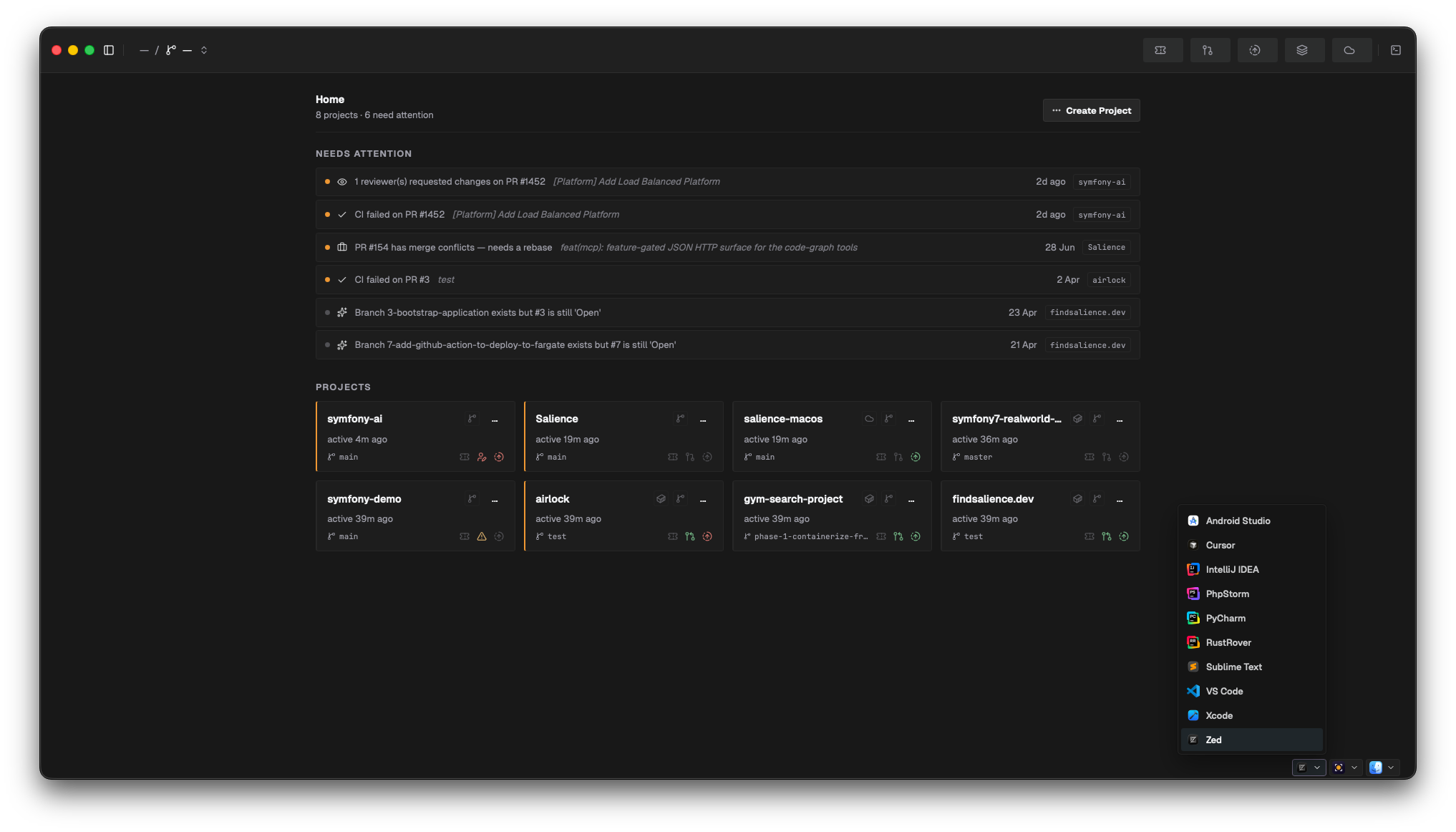
Salience detects the "open in editor" apps installed on your machine and lets you pick a default for each of three slots. Detection runs at app start and again when the app regains focus, so installing a new editor doesn't need a restart — just tab away and back.
What it looks for:
- Editors — the JetBrains family (PhpStorm, IntelliJ IDEA, PyCharm, WebStorm, GoLand, CLion, Rider, RustRover, Android Studio), VS Code, Cursor, Sublime Text, Zed, Xcode
- File manager — Finder
- Terminals — Terminal, iTerm2, Termius
Only what's actually installed shows up in the pickers; the full catalogue is checked every scan, which is cheap.
Each detected launcher declares what it can do — open a path, open a path at a specific line, reveal a path, open a shell at a directory, two-way diff, three-way merge — and pickers filter by that. So a "diff" affordance only offers launchers that can actually diff.
Where you set the defaults: the app footer, which carries three pickers — one each for editor, terminal, and file manager. Picking an option sets the default for that slot. Your choices persist in the same local SQLite database as your connector credentials, keyed under launchers, and apply globally rather than per project.
Credentials
Connector tokens are not in any of the files above — they're stored in an encrypted local SQLite database at ~/Library/Application Support/clegginabox.salience/. See Privacy & security for details.