AWS
Connect AWS to see your ECR images and the ECS tasks running them, and to follow a commit from its build to where it's deployed.
What appears in Salience
Salience reads these resources from the AWS account and region you connect:
| Resource | What you see |
|---|---|
| ECR repositories | Their images, with tags, digests, push time and size. |
| ECS clusters | Status and counts of running tasks, pending tasks and services. |
| ECS task definitions | The latest active revision of each family, with its containers, images, ports, CPU, memory and log settings. |
| Running ECS tasks | Each task's family and revision, launch type, availability zone, start time and containers. |
Salience reads only the repositories, clusters and task definitions you pick. Connecting on its own reads nothing from your account.
Plain-text environment variable values in task definitions are dropped before anything is stored. Secrets appear only as references to where they're stored.
From commit to running task
Salience can follow a piece of work from its build to where it's running:
Commit → ECR image → task definition → running task
- A commit is linked to an image when the image has a tag containing the commit SHA — for example
abc1234,sha-abc1234ormain-abc1234. This needs the ECR repository linked to your source repository first (see Link a repository to its source). - An image is linked to a task definition when a container in the task definition uses that image, by digest or by tag.
- A running task is linked to its task definition by family, so tasks still running an older revision are included.
On a unit of work, the Deploy card shows how many tasks are running images from the linked repository, or Not deployed.
Where AWS appears
Once you've picked a repository or cluster, an AWS entry appears in the project's sidebar, with two pages:
- ECR — your repositories and their most recent images.
- ECS — each cluster and its running tasks. A task shows Deploy drift when it runs an older revision than the latest one registered for its family. Each task's menu has Tail logs, Copy SSM exec command, Copy task ARN, View task definition and Open in AWS console.
Before you connect
You need:
- A working AWS CLI profile in
~/.aws/configor~/.aws/credentials. Access keys, SSO and assumed roles all work. - The region your resources are in.
- Permission to call the read-only actions listed in the Permissions card (see Permissions).
Salience stores no AWS secret. It saves the profile name, region and account ID, and asks the AWS SDK to resolve credentials each time, the same way the aws command does.
Connect AWS
AWS is connected per project. Each project uses one profile and one region.
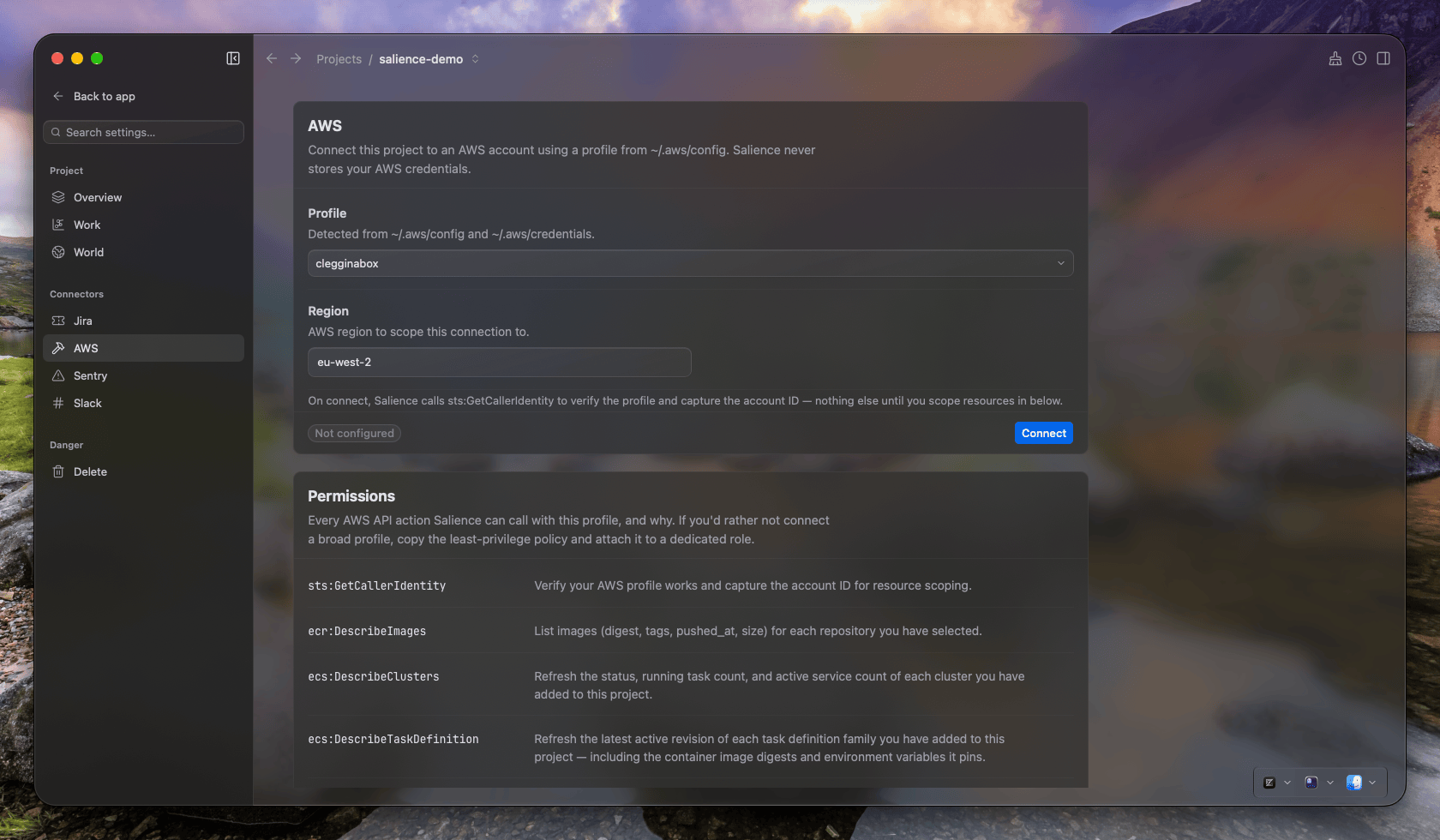
- Open the project's Project settings → AWS.
- In the AWS card, choose a Profile and enter a Region, e.g.
eu-west-2. - Click Connect. Salience calls
sts:GetCallerIdentityto check the profile works and to find the account ID. It shows Connected as followed by the identity it found. - Pick what this project should track:
- ECR repositories — only ticked repositories have their images read. Ticking one fetches its images straight away.
- ECS clusters — only ticked clusters, and the tasks running on them, are read.
- ECS task definitions — lists only the families used by a service on one of your ticked clusters. Pick clusters first.
Link a repository to its source
To link commits to images, tell Salience which source repository builds each ECR repository.
- Open Project settings → Overview.
- In Artifacts, find the ECR repository marked no source linked.
- Choose the source repository from pick source repo….
Without this link, images and tasks still appear, but they aren't connected to your commits, and the Deploy card shows Not deployed.
Permissions
The Permissions card lists every AWS action Salience can call, each with the reason it's needed. All of them are read-only:
| Service | Actions |
|---|---|
| STS | GetCallerIdentity |
| ECR | DescribeRepositories, DescribeImages |
| ECS | ListClusters, DescribeClusters, ListServices, DescribeServices, ListTasks, DescribeTasks, DescribeTaskDefinition |
There are no write, delete or deploy actions. Copy least-privilege policy copies an IAM policy with exactly these actions. Once you've connected, the policy is filled in with your account and region. Attach it to a dedicated role or user, and point Salience at that profile instead of a broader one.
Tail logs isn't covered by this policy. It runs the AWS CLI with your profile, so the profile needs CloudWatch Logs read access for it to work.
Check the connection
The AWS card shows Connected with the profile, region and account. Each picker shows how many items are scoped, e.g. 2 of 7 scoped.
Open the AWS entry in the sidebar. The ECR page lists the images in your ticked repositories. The ECS page lists the running tasks on your ticked clusters once they've been read.
The Sync status tile has rows for ECR images, ECS clusters, ECS task definitions and ECS tasks.
AWS data refreshes about every minute for the project you're working in, and less often for projects you haven't opened recently. Turning off Deploys in Project settings → Work stops AWS refreshes for that project.
Limitations
- ECR and ECS only. RDS, Lambda and EC2 appear in the AWS page's navigation marked soon. They aren't supported yet.
- One profile and region per project. To change either, disconnect and connect again.
- Private ECR images only. Task definitions that use images from public ECR, Docker Hub or another registry aren't linked to images.
- Latest task definition revision only. Revision history isn't stored. A task running an older revision shows its family and revision number, but not that revision's details.
- Deploy drift compares with the latest registered revision. Registering a new revision without deploying it shows drift on the running tasks.
- Stopped tasks disappear. Salience shows running tasks only.
- Data stays until you remove it. Images deleted from ECR stay in Salience until you untick their repository. Disconnecting removes the profile and region, but not the data already read.
- Standard AWS partitions only. GovCloud and China regions aren't supported.
- The copied SSM exec command doesn't include your profile. Add
--profileyourself if you don't use the default profile.
Troubleshooting
The Profile list is empty. Salience reads profiles from ~/.aws/config and ~/.aws/credentials. Run aws configure or aws sso login in a terminal, then click Refresh.
Connecting fails with GetCallerIdentity failed. The profile couldn't get credentials. If it uses SSO, run aws sso login --profile <name> and try again. Check that aws sts get-caller-identity --profile <name> works in a terminal.
Data stopped updating. Your SSO session has probably expired. Run aws sso login in a terminal. You don't need to reconnect, because Salience resolves credentials again on every refresh. Then click Refresh on the pickers.
A picker fails with DescribeRepositories failed or similar. The profile lacks that permission. Compare its policy with the Permissions card.
No task definitions are listed. Tick a cluster first. The picker only shows families that a service on a ticked cluster uses.
The Deploy card shows Not deployed. Link the ECR repository to its source in Project settings → Overview → Artifacts. Also check that your image tags contain the commit SHA.
Tail logs fails. The task's containers must use the awslogs log driver, its task definition must be ticked, and AWS CLI v2 must be on your PATH. The profile also needs CloudWatch Logs read access.