My Work & Stand-up
Two views over the same joined data. My Work is your personal priority list — what needs your attention, in order. Stand-up is the ticket board — everything in flight for the project, whoever owns it.
What's a unit of work?
Both views are built from units of work: one piece of work joined across every dimension the project tracks — the local branch, the pull request, the ticket, CI for the PR's head commit, and (when AWS connectors are wired) the deploy. Any dimension can be missing: a branch with no PR yet is still a unit, and so is a To Do ticket with no branch. Salience materialises units continuously from synced entities — see Concepts.
My Work
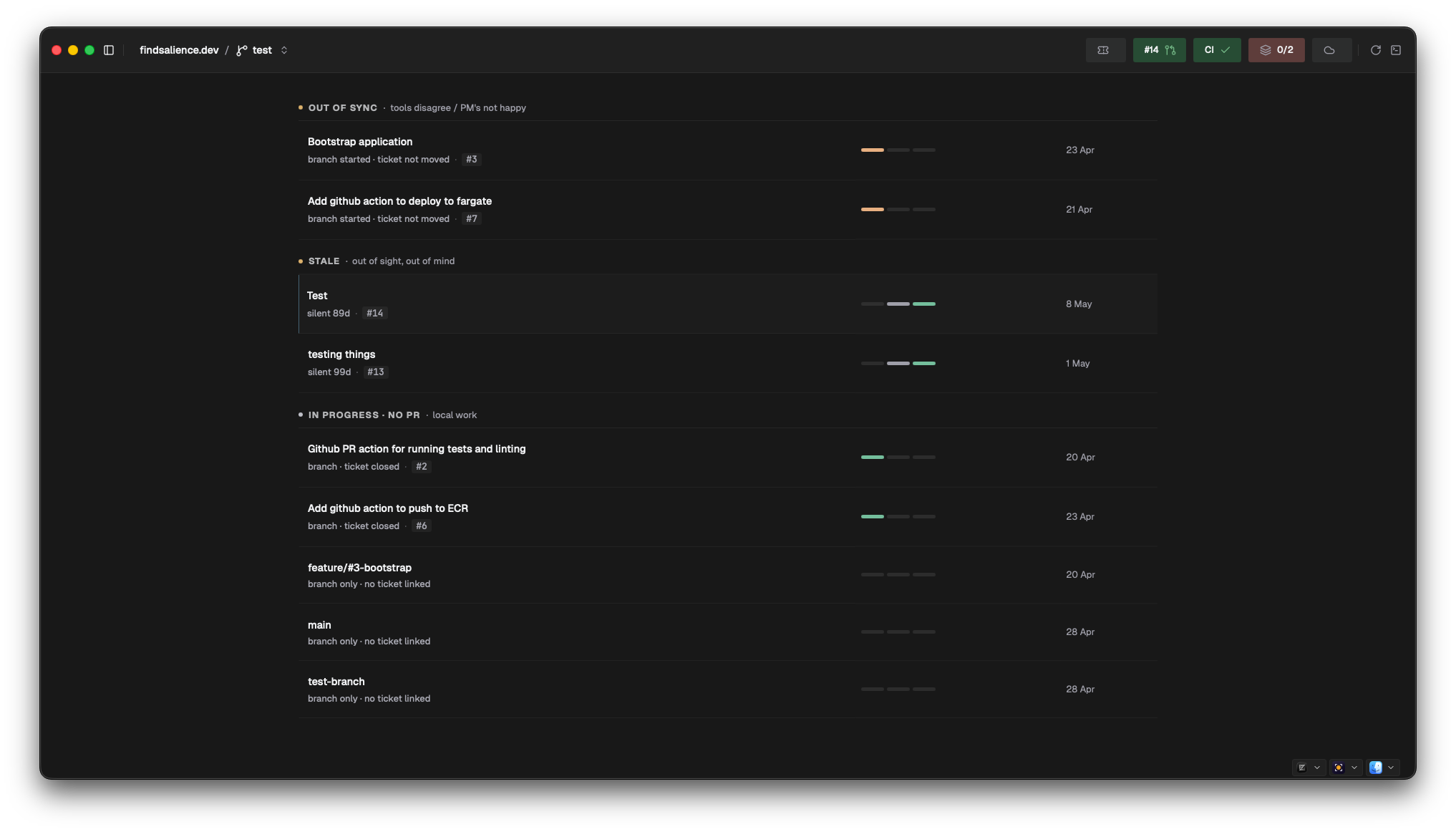
Units grouped into sections, rendered in a fixed priority order — the top of the page is always the most urgent thing. Only sections with something in them appear.
| Section | What it means |
|---|---|
| Needs your review | Someone else's PR, your verdict requested |
| Changes requested | Your PR — a reviewer asked for changes |
| Stuck in review | Your PR, three or more review rounds — time for a conversation |
| CI failing | Your PR, red on the latest push |
| Blocking | Your work is holding other tickets up |
| Out of sync | Your tools disagree about this work (see below) |
| Stale | Your PR — the reviewer hasn't engaged in days |
| Ready to merge | Your PR — ship it |
| Awaiting review | Your PR, waiting calmly |
| Blocked | Waiting on another ticket |
| In progress · no PR | Local branch, no PR opened yet |
| To do | No work started |
| Deployed | Shipped |
Out of sync is the cross-source section no single tool can give you: PR merged but the ticket not closed, branch started but the ticket not moved, ticket marked done while the PR is still open, or a ticket in an active workflow with no branch or PR at all. The row's meta line tells you which.
What appears here
My Work is user-relative, not just project-scoped. A unit shows up when you own it or are directly involved — ticket assigned to you, branch or PR you authored, or a PR where your review is requested. Untouched team tickets stay off the page.
The page is live: units update as syncs land and as your local branches change. There's no manual refresh, and currently no filters on this page — audience filtering lives on Stand-up.
Stand-up
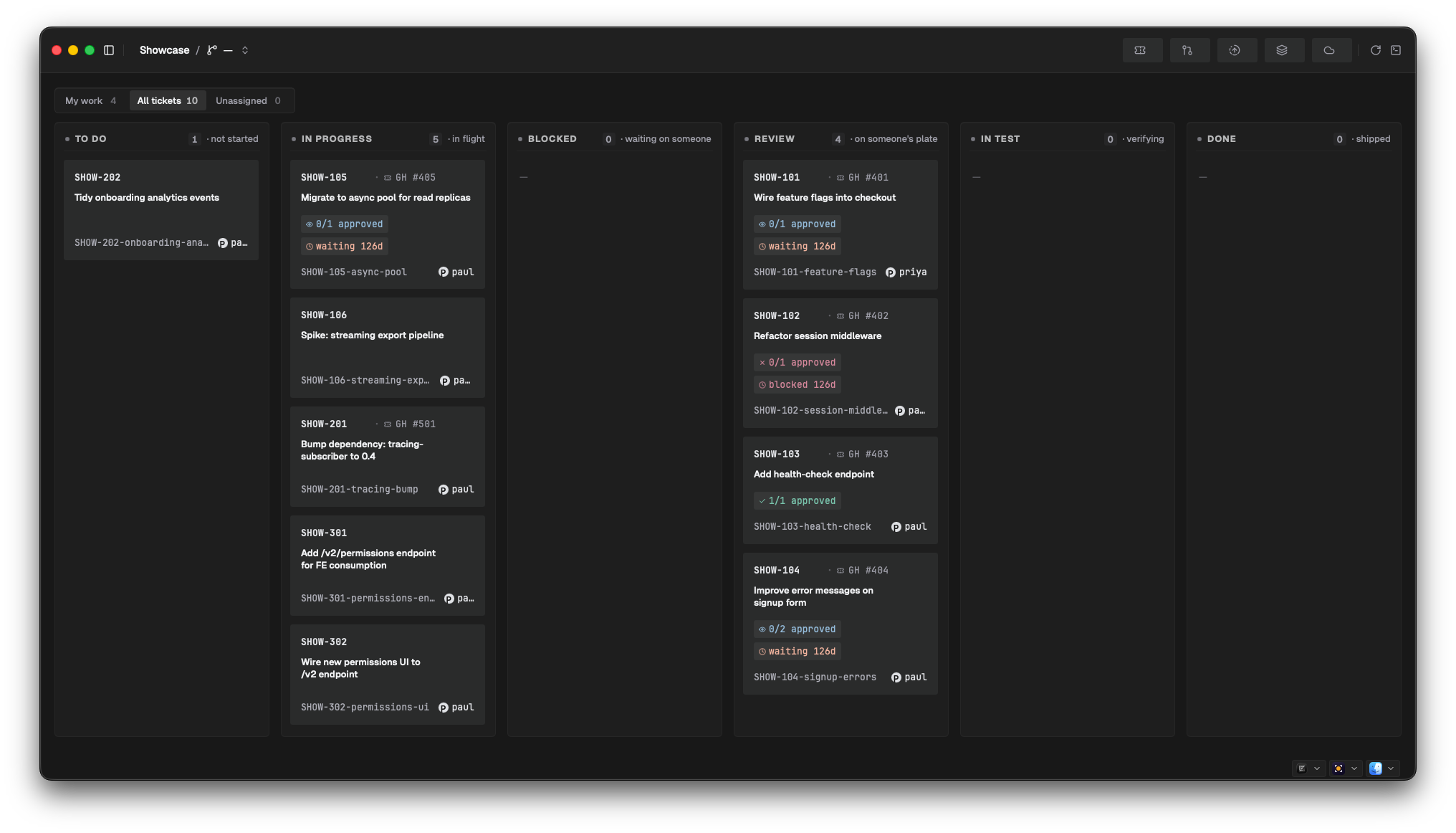
One row per ticket, with the matching branch and any PRs joined alongside — read your update straight off the screen. Salience finds the branch by looking for the ticket key (e.g. LW-508) in branch names, and joins PRs via the branch and via keys in PR head branch names. This means the join depends on Jira-style keys appearing in your branch names; branches named without a key won't attach to their ticket.
Board and list modes
The header toggles between two renderings of the same rows:
- Board (default) — a kanban of status columns: To do, In progress, Blocked, Code review, In test, Done. Empty columns stay visible so the pipeline shape reads end-to-end.
- List — the same rows grouped by status, empty groups dropped.
Filters
| Control | What it does |
|---|---|
| My work / All tickets / Unassigned | Audience filter, with live counts. "My work" means: assigned to you in Jira, a branch you started with no PR yet, a PR you authored, or a PR requesting your review. "Unassigned" shows tickets with no assignee. |
| Board picker | Appears when the project has Jira boards. Scope rows to one board, or "All boards". |
| Tick toggle | Hide completed tickets (on by default). |
The header also shows a row count, and a warning icon per connector whose last sync failed — hover it for the error.
The unit page
Click a unit's title on My Work to open its dedicated page: a graph of the unit's dimensions — ticket → branch → PR → CI → deploy, plus any blocking/blocked tickets hanging off it — a PR cadence chart, and a per-unit timeline. Cards update live as the underlying entities change.
The deploy node only fills in when AWS connectors are connected and the image/task correlation chain exists for the project — for most setups it stays empty. See Connect your tools for what feeds each dimension.